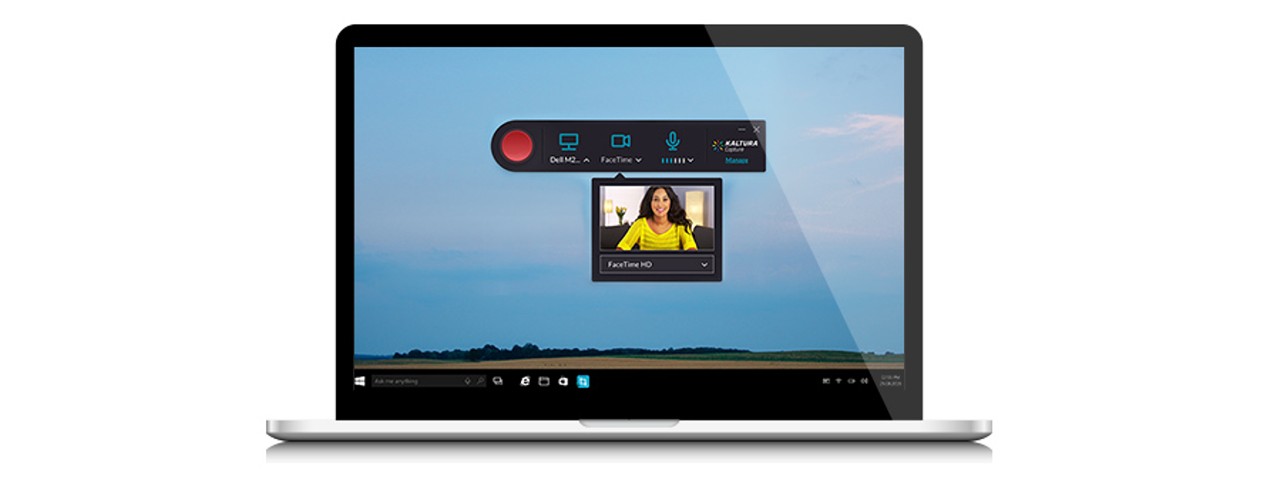
Kaltura upgrade set for May 9
Kaltura CaptureSpace is becoming Kaltura Capture. On June 15, Kaltura will retire Kaltura CaptureSpace and it will no longer be available

What is Kaltura Capture?
Kaltura Capture is the new upgraded version of video capturing software (previously called Kaltura CaptureSpace) from Kaltura. Kaltura Capture is a video tool that allows both instructors and students to create, upload and publish videos for use in their classes. This may include a webcam video, an audio recording, a screen recording, a PowerPoint presentation or a combination.
Why are we making this change?
Kaltura has upgraded its software to create an easier and more user-friendly experience for everyone. As of June 15, Kaltura will retire Kaltura CaptureSpace and it will no longer be available in Blackboard, Canvas and the college and departmental Kaltura Media Space (KMS).
What is different?
Kaltura Capture is more user friendly and the interface has changed a bit.

This image compares the new Kaltura Capture interface, left, with the retiring Kaltura CaptureSpace interface. The new interface contains similar elements but has a different look and feel.
For the most part, Kaltura CaptureSpace and Kaltura Capture have the same functionality and tools built-in but display in a different configuration.
Kaltura Capture is a recording tool and does not have the ability to do quick clipping like Kaltura CaptureSpace did. Once you upload your media to Kaltura’s My Media in Blackboard or Canvas, you can edit your media.
How will this impact me?
Kaltura Capture and Kaltura CaptureSpace are two unique applications on your computer. Videos saved in the old Kaltura CaptureSpace will not show up in Kaltura Capture.
We encourage users of Kaltura CaptureSpace to upload all of their Kaltura CaptureSpace videos into Kaltura’s My Media in either Blackboard or Canvas. Once all of your Kaltura CaptureSpace videos are uploaded, you should uninstall Kaltura CaptureSpace from your computer and begin using Kaltura Capture.
Access to Kaltura CaptureSpace will be disabled at UC on June 15.
How do I move from Kaltura CaptureSpace to Kaltura Capture?
Access to Kaltura Capture will be available starting May 9. We encourage you to download Kaltura Capture and try it. The media you want to keep currently in Kaltura CaptureSpace will need to be uploaded to Kaltura’s My Media by June 15. Then, uninstall Kaltura CaptureSpace from your computer and begin to use Kaltura Capture.
Where do I go for help?
For more information on the Kaltura upgrade, please visit the Kaltura Capture webpage.
For help with Kaltura issues, please contact Canopy support by calling (513) 556-HELP (4357) OR (866) 397-3382; select option 3 in the menu. Or, start a chat with technicians.
Related Stories
Sugar overload killing hearts
November 10, 2025
Two in five people will be told they have diabetes during their lifetime. And people who have diabetes are twice as likely to develop heart disease. One of the deadliest dangers? Diabetic cardiomyopathy. But groundbreaking University of Cincinnati research hopes to stop and even reverse the damage before it’s too late.
App turns smartwatch into detector of structural heart disease
November 10, 2025

An app that uses an AI model to read a single-lead ECG from a smartwatch can detect structural heart disease, researchers reported at the 2025 Scientific Sessions of the American Heart Association. Although the technology requires further validation, researchers said it could help improve the identification of patients with heart failure, valvular conditions and left ventricular hypertrophy before they become symptomatic, which could improve the prognosis for people with these conditions.
Combination immunotherapy helps overcome melanoma treatment resistance
November 10, 2025

MSN highlighted research led by the University of Cincinnati Cancer Center's Trisha Wise-Draper showing a combination of immunotherapy medications can activate a robust immune response and help overcome treatment resistance in patients with refractory melanoma.